Recording vs. transcript vs. summary vs. recap
Not every post-call output is equally useful.
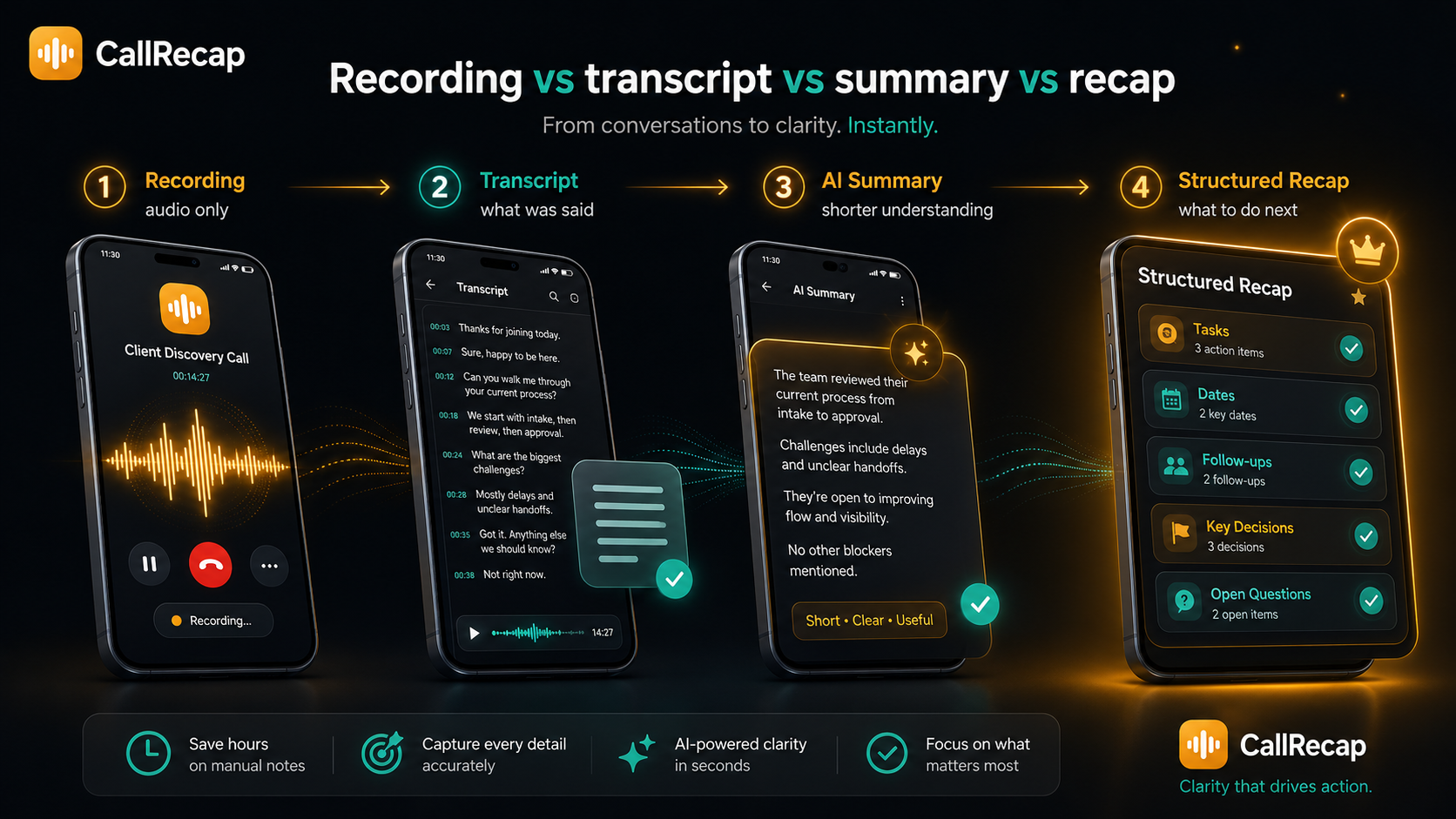
That distinction matters. A summary helps you understand the call. A recap helps you act on it. If you are choosing a call recorder with AI summary, look for an app that goes beyond a paragraph and turns the call into structured next steps.
Because after most calls, the real question is not "what was said?" It is "what needs to happen next?"
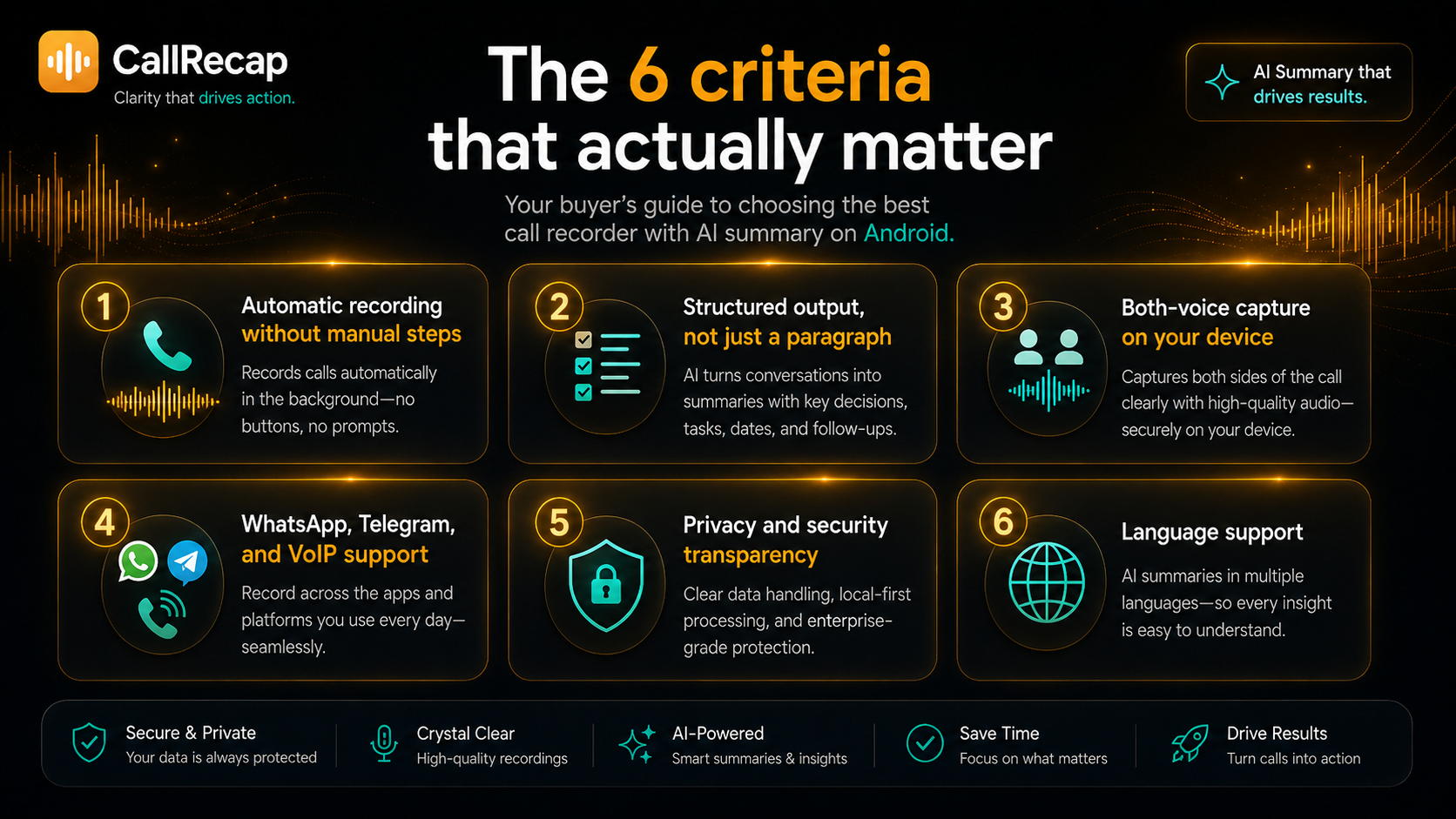
The 6 criteria that actually matter
Before installing any app, use these six criteria as your filter.
Red flags to watch for
- ✕Only records one side. If recent reviews on your device mention "only records my voice," the AI summary will be based on half a conversation.
- ✕Manual start required. Apps that require a tap to begin recording will miss calls — especially incoming ones you were not expecting.
- ✕Summary only, no task extraction. A paragraph still requires you to read and parse it. Look for apps that extract tasks, dates, and follow-ups explicitly.
- ✕No privacy details. If the app does not explain how recordings are handled, how long data is kept, or how users can delete their data, do not use it for sensitive calls.
- ✕Requires root. Root-based recording is not practical for most users and creates security risks. Avoid workflows that require modifying your device.
- ✕Unclear pricing. Be careful with apps that hide limits, push unclear trials, or make cancellation difficult.
How the top options compare
| App | Auto record | AI summary | Tasks + dates | VoIP | Notes |
|---|---|---|---|---|---|
| CallRecap | Yes | Yes | Yes | Via Connect | Built for post-call action |
| Otter.ai | No native | Yes | Partial | No | Strong for meetings |
| Cube ACR | Yes | Not core | No | Varies | Strong recorder, no AI recap |
| Google Recorder | No | Limited | No | No | In-person on Pixel only |
| Rev | Manual | Depends | No | No | Transcription service |
The key point is not that one app is universally better. These tools were built for different jobs. Some for meetings, some for recording, some for transcription services. CallRecap is built for phone calls that need to become action.
What CallRecap does differently
CallRecap is built around one premise: the recording is not the product. The recap is.
When a call ends, CallRecap turns it into structured output:
- →Summary — plain-language overview of what was discussed, ready in seconds.
- →Tasks with dates — "send the revised quote by Friday" becomes a task, not a memory.
- →Follow-ups — who said they would do what, structured and visible.
- →Key decisions — what was agreed, what changed, what is still open.
- →Open questions — anything raised but not resolved, so nothing falls through.
- →Full transcript — searchable if you need to verify an exact detail.
So instead of replaying a recording, you can understand what happened and what needs to happen next. The audio file becomes the backup. The recap becomes the working document.
Built for privacy, security, and control
CallRecap is designed for conversations that may matter. Privacy and security are not optional extras.
CallRecap uses secure AI processing infrastructure to generate transcripts, summaries, tasks, dates, and follow-ups. The system is designed to process call data only for the purpose of delivering the recap experience, according to our Privacy Policy and Terms.
- Encrypted data handling
- Controlled access to user data
- Documented privacy practices
- User data deletion options
- Transparent permissions
- Security-focused processing
- Privacy-by-design product decisions
We do not believe users should have to guess what happens to their call data. CallRecap keeps privacy information clear, accessible, and written for real people — not only lawyers.
For full details: callrecap.app/privacy · callrecap.app/terms
What "secure AI processing" should mean
When an app uses AI to summarize calls, the important question is not only whether the AI is powerful. It is whether the product handles sensitive information responsibly. A trustworthy AI call summary app should explain:
- What information is processed
- Why it is processed
- How it is protected
- How long it is kept
- How users can control or delete it
- What permissions the app needs
- How the company limits unnecessary data access
CallRecap is built around that standard. You should get useful recaps without losing control over your information.
WhatsApp, Telegram, and VoIP calls
Regular phone calls are only part of the picture. Many important conversations now happen on WhatsApp, Telegram, and other VoIP apps.
CallRecap Connect — required free companion
Connect is the required free companion app that records all your calls reliably — regular phone calls and VoIP (WhatsApp, Telegram, and more). Same post-call experience: transcript, summary, tasks, dates, follow-ups.
Whether the call happens through your phone line or a VoIP app, the goal is the same — end the conversation with clarity. Learn more about Connect →
Who should use a call recorder with AI summary
-
Sales professionals
A prospect may mention a budget, objection, timeline, or follow-up in one sentence. CallRecap captures those details automatically so follow-up is faster and more accurate.
-
Freelancers & consultants
Scope, rates, timelines, and deliverables discussed on calls become a reliable written reference. No guessing later.
-
Recruiters
Candidate availability, salary expectations, interview timing, and next steps can easily blur together. A recap keeps each call organized.
-
Real estate agents
Prices, conditions, timelines, preferences, and next steps — visible before the next showing or negotiation.
-
Lawyers & advisors
Client calls can include important caveats, instructions, and conditions that should not depend on memory.
-
Busy professionals
If you handle several important calls per day, memory is not enough. You need a record. More importantly, you need the record to be useful.
Free tier and pricing
CallRecap is free to start. The free tier includes 60 AI minutes per month — enough to test the full recap experience on real calls. No credit card required.
For heavier use:
-
Pro 600 minutes$14.99/mo
-
Max 1,800 minutes$29.99/mo
-
Minute packs one-time add-ons, any tierfrom $4.99
You can start free, test on real calls, and upgrade only if it becomes part of your workflow.
Frequently asked questions
What is the difference between a call recorder and a call recorder with AI summary?
What is the difference between an AI summary and a structured recap?
Does a call recorder with AI summary work automatically?
Can a call recorder with AI summary handle WhatsApp calls?
How accurate are AI call summaries?
Is my call data private when using an AI summary app?
Does CallRecap reveal or sell my call data?
Do I need CallRecap Connect?
What should I look for in a call recorder with AI summary?
- Automatic recording without manual triggers
- Structured output with tasks and dates, not just a paragraph
- Both-voice capture tested on your actual device
- WhatsApp and VoIP support if needed
- Clear privacy documentation
- Language support for the languages you use